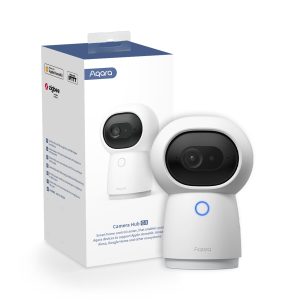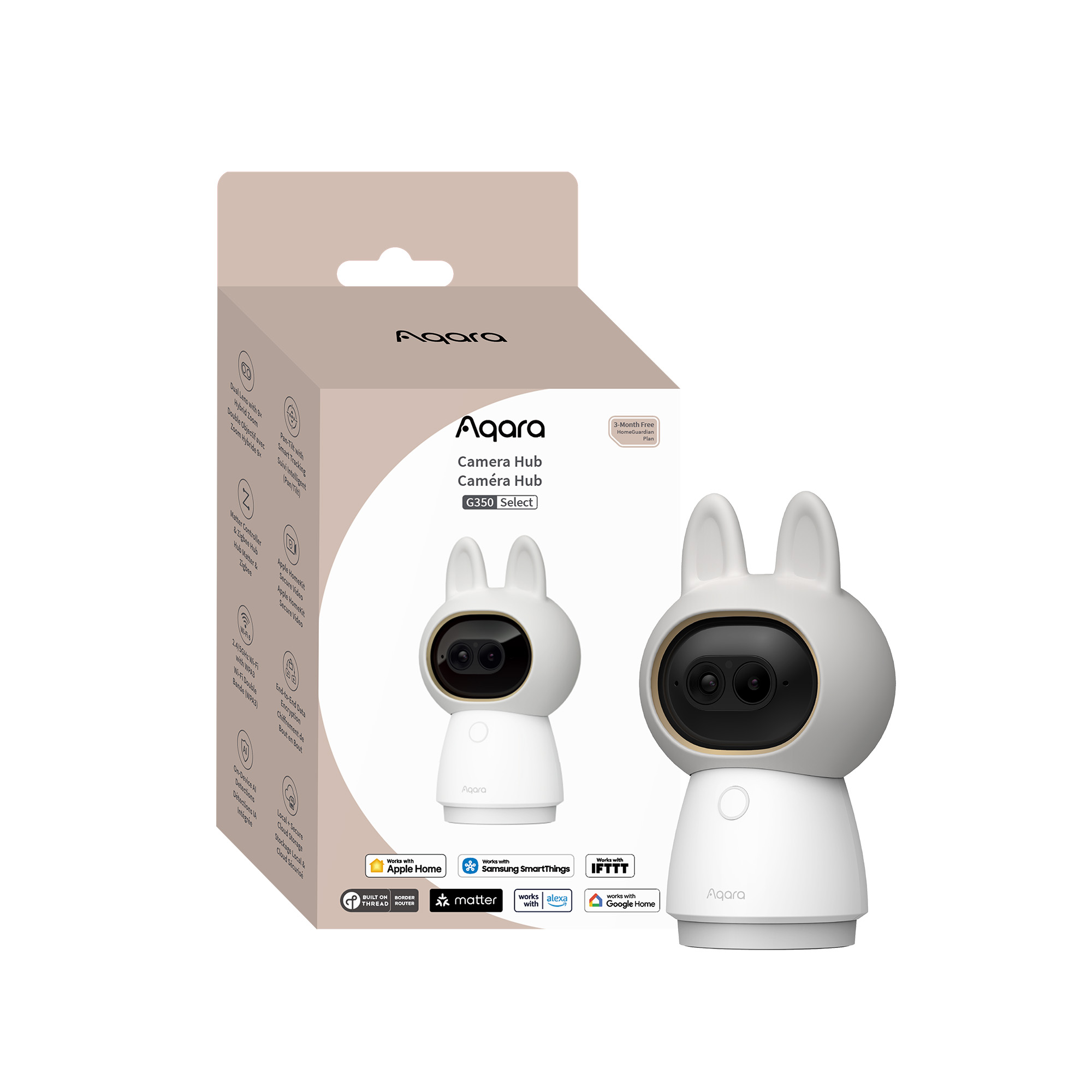


Aqara Camera Hub G350 Select
Aqara Camera Hub G350 Select with Matter 1.5, dual-lens 4K + 2.5K camera, 9× zoom, AI tracking, 360° pan-tilt, local detection, Zigbee hub, and HomeKit, Alexa & Google support.
Use offer code AQAUKMAR for 15% off!
Compatibility
Aqara Camera Hub G350 Select is compatible with the following systems:










Accessories
Available on back-order
£139.99 inc. VAT
Description
Aqara Camera Hub G350 Select
Meet the Aqara Hub G350, Aqara’s first Matter 1.5 smart camera, built to work seamlessly with mainstream smart home platforms—no extra apps or complex setup needed. Its dual-lens system combines a 4K ultra-wide camera and a 2.5K telephoto lens, delivering clear details from near to far with smooth 9× zoom. AI-powered tracking keeps people and pets perfectly in frame, while fluid pan-tilt enables full 360° room coverage. With local AI detection, high-quality two-way audio, and support for Apple Home, Google Home, Alexa, and more, the G350 makes home monitoring simple, reliable, and truly connected.
Aqara Camera Hub G350 Select Features:
- Aqara’s Matter Camera Debut: The G350 smart camera is based on the Matter 1.5 standard and can directly connect to your home’s mainstream smart platforms. Without additional applications or complicated settings, it can provide smooth, low-latency real-time monitoring, two-way intercom, and unified alarm management within your familiar ecosystem, making the whole-house smart experience truly seamless.
- 4K Clarity with 9x Zoom, Perfect Near and Far: This dual-lens camera combines a 4K ultra-wide-angle lens and a 2.5K telephoto lens, offering smooth zoom control via dial or screen touch. It captures vivid and clear images, from expansive scenes to distant details, day or night—thanks to its large f/1.6 aperture and discreet 940nm infrared night vision capability, ensuring sharp images even in low-light conditions.
- Tracks Like a Cameraperson: AI-powered automatic tracking keeps people and pets always in frame, with an intelligent close-up zoom that brings moving details into focus. And as you zoom in, the camera naturally slows its movement for smoother, more cinematic tracking.
- See Everywhere with Fluid Pan-Tilt: Enjoy 360° awareness as the camera glides smoothly around your room. It can jump to any point you tap, make panorama, or cruises as desired, and handle preset angles so important areas are always in view.
- Detects Locally, See and Hear What Matters: Local AI detection can transform people, animals, faces, smiles, voices, and gestures into meaningful cues, recordings, and an unlimited number of automations/scenes, while high-quality two-way audio allows you to react instantly, so you can see and hear what matters without being disturbed by constant noise.
- HomeKit and Other Ecosystems’ Support: Enjoy seamless integration with Apple Home (including HomeKit Secure Video)①, Home Assistant, Google Home, Alexa, and SmartThings, so your camera’s live view, recordings, and two way audio are always just a tap or voice command away across your favorite platforms.
- Matter Controller & Zigbee Hub: This camera doubles as a powerful Aqara Zigbee hub and Matter Controller as well as bridge, linking your Aqara devices to major ecosystems while pulling third party Matter devices into Aqara Home for unified, future ready control.
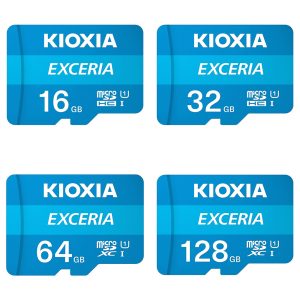
- Local and E2E-Encrypted Cloud Storage Options: Flexible storage keeps your footage safe: record 24/7 to a secured 512 GB microSD card②, back up to NAS③, or use encrypted cloud storage④ with sensor linked event timelines tailored to your smart home.
① To use the device with HomeKit Secure Video, an iCloud plan, and an Apple home hub are required. Within Apple Home, the resolution is limited to 1080p, and it may be downgraded in case of poor network conditions.
② MicroSD card not included.
③ NAS Data transfer is only supported via SD card.
④ The cloud storage requires HomeGuardian plan, which has a free trial included and activated automatically.
Aqara Camera Hub G350 Select Example Of Automation:
- Auto Privacy On Arrive
WHEN Door is unlocked; IF Light is turned on, THEN Enable Privacy Mode
When a trusted member arrives home, the camera instantly shut down lens for ultimate privacy.
(Camera Hub G350 + Aqara Smart Dock Lock + Aqara Ceilling Light T1M)
- Bedtime Guard Lite
WHEN Goodnight scene is triggered; THEN Enable IR night vision + all detections & Pan to “master overview” angle
When your Goodnight scene runs, the camera switches to night vision and turns on all detections. Notifications shift to a quiet, night-safe profile.
(Camera Hub G350)
- Elder Check-in
WHEN Absence detected in living room+bedroom from 08:00 to 10:00; IF Bedroom + Front door is closed, THEN Pan to a frequently viewed position > Record cloud video
Routine morning check for the elderly for safety and assurance.
(Camera Hub G350 + Aqara Presence Sensor FP1E + Aqara Door and Window Sensor T1)
Frequently Asked Questions
Can this camera be used outdoors?
Not recommended for outdoor use.
Non-waterproof design: This device is designed for indoor environments. The microphone hole, speaker hole, charging port, and pan-tilt gaps on the body are not sealed for waterproofing (no IP65/IP67 protection rating). Water ingress will cause motherboard short circuit damage.
Temperature limitations: Indoor devices typically have a narrower operating temperature range. Outdoor extreme cold or high temperatures from sun exposure may accelerate battery/component aging or cause system crashes.
Recommendation: Please install in living rooms, bedrooms, studies, or enclosed balconies with shelter. If outdoor monitoring is needed, please purchase our brand’s dedicated outdoor waterproof cameras.
Not recommended for outdoor use. Non-waterproof design: This device is designed for indoor environments. The microphone hole, speaker hole, charging port, and pan-tilt gaps on the body are not sealed for waterproofing (no IP65/IP67 protection rating). Water ingress will cause motherboard short circuit damage. Temperature limitations: Indoor devices typically have a narrower operating temperature range. Outdoor extreme cold or high temperatures from sun exposure may accelerate battery/component aging or cause system crashes. Recommendation: Please install in living rooms, bedrooms, studies, or enclosed balconies with shelter. If outdoor monitoring is needed, please purchase our brand's dedicated outdoor waterproof cameras.
Our dual-camera system uses the proven combination of a wide-angle lens and a telephoto lens, each with a clearly defined role:
Wide-Angle Lens (4K resolution)
With a 133° field of view, 2.8 mm focal length, and f/1.6 aperture, this lens is designed to capture more of the scene. It provides full panoramic coverage of the space and is ideal for everyday monitoring of large areas.
Telephoto Lens (2.5K resolution)
With a 43° field of view, 8 mm focal length, and f/1.6 aperture, this lens is designed to capture fine details. When you zoom in within the app (typically beyond 3× digital zoom) or enable Close-Up Tracking, the system automatically switches to this lens, leveraging its optical advantages to clearly capture distant details—such as identifying faces 5–10 meters away.
How does "Close-Up Tracking" work, and what changes when it’s turned on or off?
When Close-Up Tracking is Enabled (Intelligent Zoom Tracking):
In addition to pan-tilt tracking, the camera automatically zooms in on a target, focusing on the full body, upper body, or face to keep the subject in close view at all times.
Recommended when:
You want to clearly see facial details, confirm identity, or capture close-up details of pets.
Standard Tracking (Close-Up Tracking not Enabled):
The camera tracks the target by rotating the pan-tilt mechanism only, ensuring the subject remains within the frame without automatically zooming in.
Recommended when:
You want to observe the target’s overall movement within the room while preserving more surrounding environmental context.
What local detection features are available? Do they require payment or cloud processing?
Our device has a built-in high-performance AI chip. The following features are all local Detection (Edge AI), requiring no cloud upload for processing, no additional paid subscription, with faster response times and better privacy protection.
Human/face/smile recognition: Quickly recognizes people in the frame.
Animal detection: Recognizes pets such as cats and dogs.
Cry/abnormal sound monitoring: Recognizes babies crying, dog barking, coughing, snoring, loud noises, and alarm sounds.
Gesture recognition: Includes static gestures (such as OK) and dynamic gestures (such as waving).
Lens obstruction detection: Detects when the lens is externally obstructed.
Note: Although detections are completed locally, pushing messages to your phone app still requires an internet connection.
When I'm already connected to the Alexa/Google Home ecosystem platform, why are some features unavailable?
Third-party Ecosystems usually only support basic capabilities (video feed, on/off). Advanced AI, pan-tilt control, and presets need to be used in the Aqara app. Detections can be used via Advanced Matter Bridging (check Aqara.com for details)
Why are people or pets sometimes not recognized?
AI features may be disabled, the camera could currently be using infrared night vision with reduced recognition capability, the target distance could be too far, or the angle may be abnormal.
What kind of memory card is needed for 4K recording?
Due to the high bitrate of 4K video, it is strongly recommended to use a high-speed microSD card rated Class 10 or above. Lower-speed cards may cause recording stutter, dropped frames, or recognition failures. The maximum supported capacity is 512 GB.
The device feels warm, is this normal?
This is normal. The device needs to simultaneously process 4K video encoding, dual video stream fusion, and high-computing AI algorithms (face, gesture, and voice recognition running simultaneously). The chip operating under high load generates heat. We have adopted a passive cooling design, and the hot exterior indicates that internal heat is being dissipated. Please use with confidence. However, do not cover the heat dissipation vents and avoid direct sunlight on the device
How do I connect the camera to the Whole-house Intelligence Hub or other ecosystems (such as HomeKit/Alexa)?
Third-party integration: Authorize in “Third-party services” in the Aqara app. HomeKit/Secure Video: Please scan the HomeKit QR code on the device body. Please note that in HomeKit mode, for privacy and due to Apple’s restrictions, the resolution may be limited to 1080P, and some AI features (such as crying detection) may not be displayed in the Apple Home app and need to be viewed in the Aqara app.
What does "Multi-Protocol Hub Function" mean? Do I still need to buy another Hub?
This device has a built-in Zigbee/Thread Hub module. This means you can directly purchase Aqara child devices that support this protocol (such as Door and Window Sensors, temperature and humidity monitors, smart bulbs), and connect them directly to the camera without needing to purchase a separate Hub. Note: If there is a power outage or network disconnection, cross-device local Automations may be affected, depending on the protocol type.
Why is there a whistling sound during two-way talk?
Please do not use your phone app for call testing next to the camera. The audio loop formed between your phone’s microphone and the camera’s microphone will create interference. Please test in different rooms.
How do I use panoramic preset angles? What should I do if the position is inaccurate after pressing?
First generate a panorama: Press “Generate Panorama” in the app, and the camera will rotate a full circle to capture images. You can press any location on the panorama to make the camera quickly turn to that point. Calibration: If you find that the pressed location is offset, or the pan-tilt drifts after long-term use, press “Pan-tilt Calibration” in the settings, and the device will automatically reset and correct the deviation.
Why is the alert for snoring or coughing sound not working?
Sound AI detection relies on audio features and decibel thresholds.
Environmental noise: If there is continuous noise such as a TV or fan noise in the room, it will interfere with the detection of weak snoring sounds.
Distance: It is recommended to place the device closer to the bedside (such as on a nightstand or in a corner). If the distance is too far (over 4 meters), it may not accurately capture low-frequency snoring sounds.
Background noise will significantly affect accuracy, so avoid placing it near TVs or speakers.
Sound AI detection relies on audio features and decibel thresholds. Environmental noise: If there is continuous noise such as a TV or fan noise in the room, it will interfere with the detection of weak snoring sounds. Distance: It is recommended to place the device closer to the bedside (such as on a nightstand or in a corner). If the distance is too far (over 4 meters), it may not accurately capture low-frequency snoring sounds. Background noise will significantly affect accuracy, so avoid placing it near TVs or speakers.
Maintain proper distance: Ensure your full body is visible within the frame.
Use clear movements: Fully extend your arms when making gestures, and avoid blocking the camera or moving too quickly.
Face the camera directly: Try to face the camera as much as possible, keeping gestures clear and fully visible within the frame. You may enable recognition sound prompts to help confirm successful detection.
Why does smart tracking sometimes lose the target, or rotate too fast/too slow?
Installation position: The recommended installation height is 2-3 meters. Do not install it too high, otherwise the overhead viewing angle will reduce person detection accuracy.
Light impact: In backlit scenes or extremely dark environments, AI recognition frame rate will decrease. Avoid placing strong light sources (windows, lights) in the center of the frame.
Multiple target interference: If multiple people or multiple pets appear in the frame at the same time, the algorithm will try to capture as many targets as possible, which may cause targets at the edges to be discarded.
Why does the pan-tilt feel slightly delayed or not smooth enough when rotating?
Network latency could be high, try lowering the video quality before continuing.
Repeated rapid control actions may cause command queuing and increased delay. It is recommended to wait for each operation to complete before issuing the next command.
Why isn't the image as clear as expected?
Due to network conditions, the current stream may not be at the highest bitrate. Actual video clarity is limited by uplink bandwidth and network status
Is the 9x zoom lossless?
Our device uses hybrid optical zoom technology. At 1x (wide-angle) and 3x (telephoto native magnification), the image quality is lossless. Between 1x-3x and 3x-9x, digital cropping and algorithmic enhancement using high-pixel sensors is utilized. The higher the magnification, the slightly more noise may appear.
Why does the image "jump" when zooming? Why is the color different when zooming?
This is a normal hybrid zoom switching phenomenon. When you zoom from 1x to 3x (the switching point), the system switches from the 4K wide-angle lens to the 2.5K telephoto lens. Due to the different physical apertures and focal lengths of the two lenses, there will be subtle differences in light intake and white balance. Although we have calibrated as much as possible through algorithms, the instantaneous field of view hopping and slight color difference are inherent optical physical characteristics.
The camera supports Wi-Fi 6, but my connection fails or frequently drops. What should I do?
Although the device supports dual-band Wi-Fi 6, connection stability may be affected by router distance and configuration. The device supports both 2.4 GHz and 5 GHz bands:
Use 2.4 GHz when stronger wall penetration and longer range are required.
Use 5 GHz when the device is close to the router and higher speeds are preferred.
On some older routers, enabling Wi-Fi 6 (802.11ax) mode may cause compatibility issues. If you experience problems, try disabling TWT (Target Wake Time) in the router settings, or temporarily switch the router to Wi-Fi 5 (802.11ac) mode for testing.
WPA3 encryption:
The device supports WPA3. However, if there are older devices on your network, it is recommended to use WPA2/WPA3 mixed mode for better compatibility.
Videos
Product Specifications
Physical and Performance Attributes | |||||||||||||||||||||||||||||
|---|---|---|---|---|---|---|---|---|---|---|---|---|---|---|---|---|---|---|---|---|---|---|---|---|---|---|---|---|---|
| Weight | 485 grams | ||||||||||||||||||||||||||||
| Dimensions (L x W x H) | 112 × 75 × 166 mm | ||||||||||||||||||||||||||||
Misc Product Attributes | |||||||||||||||||||||||||||||
Specifications:
| |||||||||||||||||||||||||||||
You may also like…
-
15% OFF!

Aqara Camera Hub G3
Original price was: £99.98.£84.98Current price is: £84.98. inc. VAT Add to basket -
Aqara Smart Pet Care Kit
£209.99 inc. VAT Read more -
15% OFF!
Aqara Camera E1
Original price was: £54.98.£46.74Current price is: £46.74. inc. VAT Add to basket -
30% OFF!
Aqara Smart Security Complete Kit
Original price was: £199.99.£139.99Current price is: £139.99. inc. VAT Add to basket